

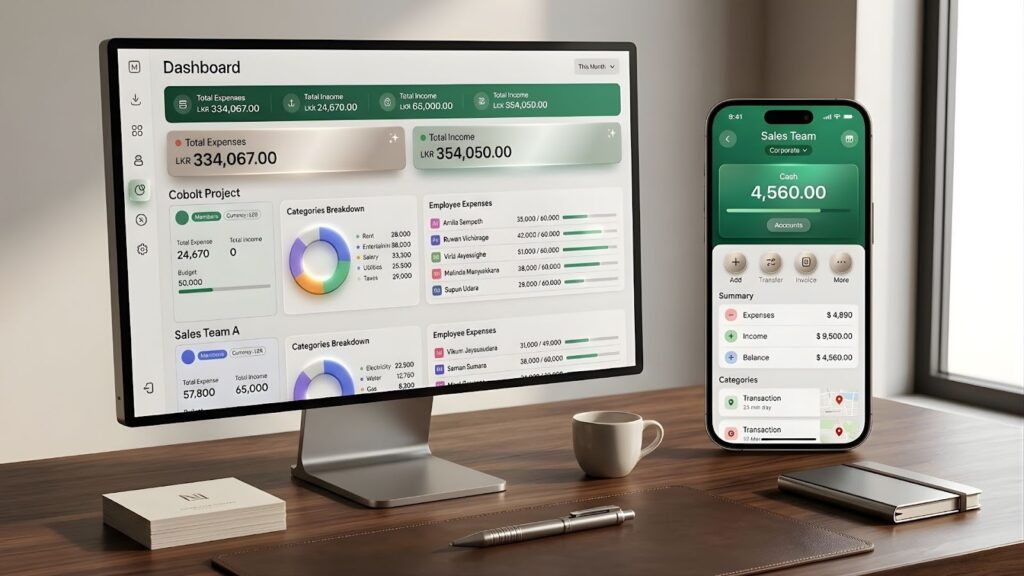
Occupational fraud costs businesses approximately 5% of their annual revenue every year, according to the Association of Certified Fraud Examiners. For many small to medium enterprises, this leakage starts at the office petty cash tin. In 2026, the physical cash box remains one of the most significant financial liabilities in a modern workplace because it relies on an outdated honor system that lacks real-time oversight.
What is digital petty cash management?
Digital petty cash management is the process of replacing your manual paper ledger and honor system with a cloud-based, mobile-first tracking application. You do not necessarily have to eliminate the physical cash tin itself, and you can still assign a designated person to hold the funds. What changes is how the money is recorded. This methodology allows employees to log small office purchases immediately on their phones, creating an instant digital receipt for any cash taken from the box or the designated custodian.
By digitizing this workflow, you transform an untraceable cash pile into a transparent and auditable digital ledger. You no longer have to worry about whether a staff member returned the correct change or lost a paper receipt. Digital management provides a secure environment where every transaction is recorded with a timestamp and a digital image of the proof of purchase. This shift moves your business from a reactive stance to a proactive state of total financial control.
Why is the physical petty cash box a liability for your business?
A physical petty cash box is a structural weakness in any modern office. Most traditional systems depend on manual spreadsheets and paper records that fail to provide transparency. Research into small business accounting suggests that manual tracking leads to a 15 percent discrepancy rate in office funds due to human error and undocumented withdrawals.
The “honor system” is a primary driver of cash leaks. When an employee takes $20 for office supplies and forgets to return the change or the receipt, the money essentially vanishes. Without real-time tracking, these small leaks remain invisible until the end of the month. This creates a stressful reconciliation process for HR heads and office managers.
Security and compliance risks are also significant.
- Physical Theft: A tin box is a target for unauthorized access.
- Faded Records: Thermal paper receipts often become illegible within months. This makes it impossible to provide audit-ready trails for a tax review.
- Administrative Waste: Managers spend an average of three hours per month chasing staff for missing paperwork and balancing the cash tin.
The physical box lacks role-based access. Anyone with the key can access the entire fund. There are no financial guardrails to prevent a single department from draining the total office reserve. Moving to digital petty cash management is the only way to ensure every cent is accounted for and every purchase is authorized.
How to move from a physical tin to a digital petty cash system
Transitioning to a digital ledger does not require a massive IT overhaul. Expense6 Corporate is designed to be the most simple and cost-effective solution on the market for controlling office funds, starting at just $19.80 USD per month for 20 users.
Here is how easily you can set up your digital petty cash system in just a few minutes:
Step 1: Create your company account
Visit expense6.com, click on ‘Corporate’, and select ‘Create Company Account’. Enter your email, company details, preferred currency, and country. After verifying your email with an OTP, set a secure four-digit PIN. From here, you simply subscribe to the base package ($19.80 for 20 seats. You can easily request more later from within the app) and sign in to your new dashboard.
Step 2: Add your users and user groups
Before creating your petty cash funds, you need to add your employees. Navigate to ‘Users and Payments’ and click ‘Add Users’. Enter their names, email addresses, and assign them a PIN. You can also group them logically to save time later by creating a user group, such as “Sales Team”.
Step 3: Create Workzones for your cash funds
In Expense6, operating departments or specific cash funds are called “Workzones”. Navigate to the Workzone tab to create a dedicated digital silo for your petty cash. For example, you can create a Workzone named “Sales Team Petty Cash”. Choose an identifying color, set it as an ‘Employee Expense Workzone’, and click next.
Step 4: Define strict expense categories
To stop cash leaks, you must control exactly what the cash can be spent on. During Workzone setup, you choose the specific expense categories your team can use. If a required category is missing, simply click ‘Create New’, type a name like “Office Supplies”, select an icon, and click create. Note: Users can only see and select the categories you explicitly define here; they cannot create their own. This keeps your digital ledger perfectly clean.
Step 5: Assign users and approval rules
Finally, filter by the user groups you built and assign employees to the new Workzone. You will notice a toggle next to their names labeled “Needs Approval”. By default, all employee petty cash expenses require admin oversight. However, if a trusted manager does not require oversight, simply uncheck this box so their expenses are auto-approved. Once saved, any employee registered will immediately see this petty cash Workzone available within their Expense6 mobile app, ready to securely log their cash spending.
How to stop cash leaks with real-time tracking
Real-time tracking is the most effective deterrent against undocumented spending. In a traditional system, the delay between the purchase and the reporting allows details to be forgotten or receipts to be lost. By the time the office manager reconciles the tin at the end of the month, the trail has gone cold.
Digital management changes the psychology of the spender. When an employee uses the Expense6 mobile app to submit claims instantly, they create an immediate digital footprint. The moment they snap a photo of the receipt, the data is uploaded to a secure management portal. This eliminates the “forgotten receipt” problem entirely.
Managers and business owners can monitor this live feed from any location. If an unusual expense occurs, you see it as it happens rather than four weeks later. This level of oversight creates a layer of “mindfulness friction.” Staff members are less likely to make impulsive or non-compliant purchases when they know every transaction is logged against their profile in real time. This accountability is the foundation of a leak-free office.
Using Corporate Workzones to isolate office funds
A major flaw in the physical cash box is that it acts as a single pool of money for everything. If one employee buys an expensive printer ink cartridge, they might unknowingly drain the entire week’s budget for milk and snacks. Corporate Workzones solve this by creating digital silos for your company capital.
Using Expense6 Corporate, you can create dedicated financial guardrails for every level of your organization. You might establish one Workzone for “Client Gifts” and another for “Fleet Maintenance.” By assigning employees to the right zone, you ensure budgets stay isolated. This prevents overspending in one category from impacting another.
- Siloed Environments: Keep Sales and HR budgets completely separate.
- Smart Budgeting: Set strict monthly spending limits per department or per employee.
- Transparent Tracking: See exactly how much budget remains for a specific project at a glance.
This structure allows you to manage company capital with total precision. Instead of reacting to a drained bank account at the end of the month, you proactively control costs within these digital boundaries. It ensures that your cash flow remains predictable and that every department stays within its allocated means.
Why role-based access is critical for office fund security
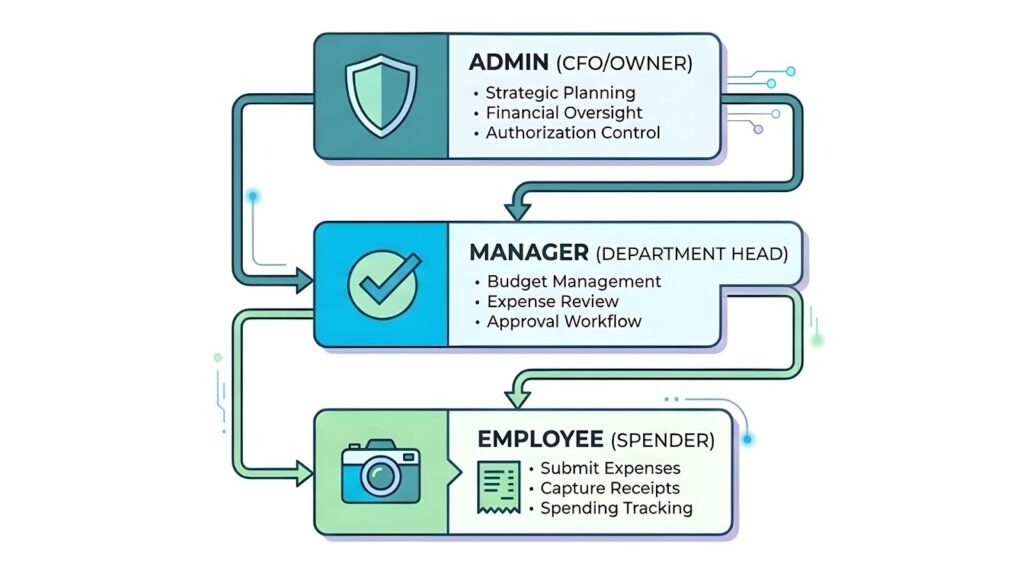
One of the biggest risks of a physical petty cash box is that it lacks a hierarchy of permissions. Anyone with access to the key has total control over the cash. Digital petty cash management introduces role-based access which provides multiple layers of security for your office funds.
Expense6 Corporate allows you to assign custom permissions to your team members. This ensures that every person has exactly the level of access they need to perform their job and nothing more.
- Admins: Usually the business owner or CFO. They have total visibility over all Corporate Workzones and can adjust global budget limits.
- Managers: Often the Office Manager or Department Head. They can review receipts and approve or reject claims from the desktop portal.
- Employees: These are the spenders. They can snap photos and submit claims through the mobile app but they cannot view or edit the master budget.
This structure prevents unauthorized changes to your financial data. It also adds a layer of privacy since employees cannot see the spending habits of their colleagues. By siloing access you ensure that your management portal remains a secure source of truth.
How to ensure ATO and IRD compliance with digital petty cash
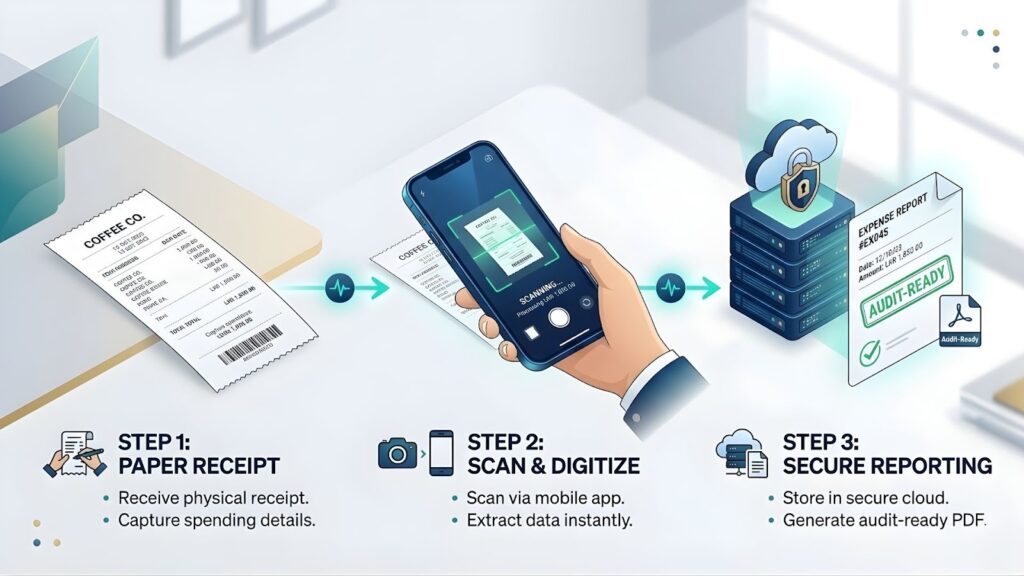
Maintaining audit-ready trails is a legal requirement for businesses in both Australia and Sri Lanka. The Australian Taxation Office (ATO) and the Inland Revenue Department (IRD) demand clear and durable records of all business expenditures. Physical receipts are notorious for fading or being misplaced. This makes your business vulnerable during a tax review or a formal audit.
Digital petty cash management turns your compliance into a passive process. Every transaction recorded in a Workzone logs the user identity and the exact time of the purchase. It also captures the physical location and the approval status. This creates a permanent digital chain of custody that satisfies even the strictest record-keeping standards.
Regional Compliance Benefits
- Australia (ATO): Use the built-in tax assistant features to track GST on small office purchases. You can export your data in a format that your accountant can import directly into professional software.
- Sri Lanka (IRD): Ensure every small purchase is backed by a valid invoice image. This helps you maintain your records for the financial year without the clutter of paper files.
By using a system that does not require a bank login, you also protect your primary financial data from third-party exposure. You get the benefits of a professional expense tracker and invoice generator without the security risks of bank syncing. When it is time to report, you simply generate a PDF or CSV file. Your business remains compliant and your data remains entirely under your control.
Final thoughts: The cost of inaction
Continuing to use a physical cash tin in 2026 is a choice to accept unnecessary risk. Every undocumented dollar is a direct hit to your bottom line. The administrative burden of chasing paper receipts and balancing mismatched books costs your management team hundreds of hours every year.
Digitizing your petty cash is not just about stopping leaks. It is about reclaiming that time and focusing your leadership on growth rather than paper trails. By implementing digital petty cash management through Expense6 Corporate, you achieve 100 percent paper-free transparency. You protect your financial data and ensure your business is always ready for a tax audit.
The transition takes minutes but the benefits last for the lifetime of your company. You can empower your team with the flexibility to make necessary office purchases while you maintain absolute control via the desktop portal.
Stop the cash leaks and eliminate the “petty cash box” problem for good. Take the first step toward a more professional and secure office environment by starting your Expense6 Corporate trial today. At $19.80 USD per month for 20 users, it is a small investment for total peace of mind.